
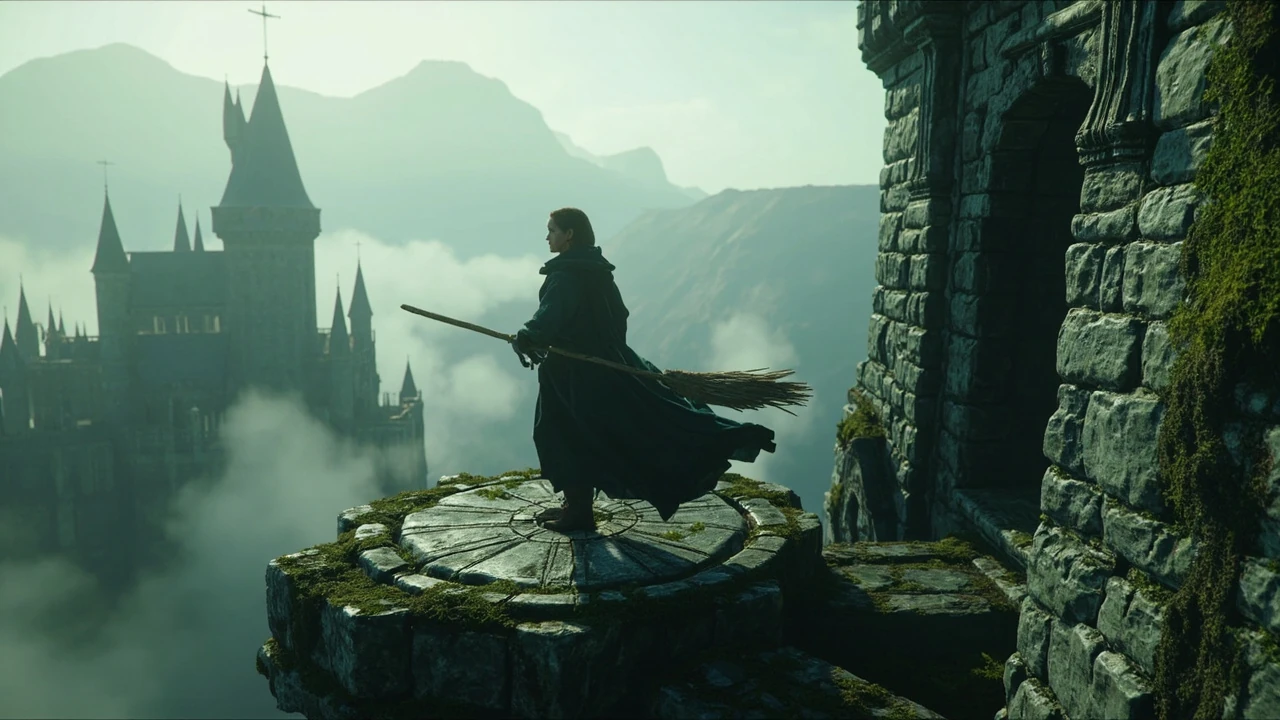
Landing platforms in Hogwarts Legacy: how flying, mounts, and broom routes connect
A landing platform is one of the smallest objects in Hogwarts Legacy, but it is also one of the most connective. Every flying broom, Hippogriff, or Thestral in the open world resolves its movement by snapping onto a circular stone disc somewhere above the Highlands, and the entire fast-travel network is built on those discs. Understanding how the platforms work, where the system places them, and why some encounters feel smoother than others depends less on the mesh and more on the level design, collision, and waypoint rules the development team chose. This page is a practical guide to landing platforms in Hogwarts Legacy written for players who want reliable routes and for developers who want to see how a small piece of world plumbing shaped a much larger game.
Players usually notice landing platforms for one of three reasons: they cannot find one in a particular region, they want to know which mesh they are snapping to, or they are curious why the animation sometimes cancels at the worst possible moment. Each of those complaints has a real answer in how the platforms were authored, streamed, and integrated with the broom and mount systems. The sections below walk through the mechanic, the design grammar of the platform itself, the way the game hides them inside regions, and the production decisions that decide where a new one appears.
What a landing platform actually does
A landing platform in Hogwarts Legacy is a collision disc with a small radius, a snap point, and a one-shot interaction that the player triggers by getting close while airborne. The disc sits at a height where the player’s broom or mount can descend from cruise altitude, the snap point forces the actor onto the platform, and the interaction runs the dismount animation, then opens either a short context menu or a fast-travel prompt. The disc is not the same thing as a fast-travel point in the world map; it is the physical landing surface that the map icon represents, and in many cases the disc is shared by more than one map node because the level designers placed several icons in a small cluster around a single real platform.
Because the platform also serves as a dismount point, the radius and orientation matter. A platform that sits too close to a wall will cancel the snap, because the broom’s collision capsule cannot resolve itself against the geometry. A platform that sits too low will often let the player land but block the dismount animation until the character finishes settling, which produces a brief half-second pause that players sometimes describe as a stutter. The development team tuned the snap distance and the height tolerance during the polish phase, and that tuning is the reason most landings feel predictable once a player has flown for a few hours.
Players sometimes ask whether there is a difference between broom landing platforms and mount landing platforms. In the released game the same physical disc accepts both, but the snap point is offset: brooms prefer the centre of the disc, while mounts such as Hippogriffs and Thestrals are nudged toward the lip because their capsules are larger. That offset is what makes dismounting from a Thestral on a small tower feel slightly different from dismounting from a broom on the same tower, and it is also why some mount landings on a roof disc look like the character is stepping sideways onto the platform.
The visual grammar of a platform
The discs share a tight set of silhouettes so players can spot them at a distance. The basic shape is a low circular base with a stone edge, sometimes flanked by a low pillar or a pair of banners, and the discs almost always sit on the highest reachable surface of a region. A platform placed next to a castle turret tends to be a clean ring. A platform placed on a cliff edge tends to be wider and lower, because the level designers had to compensate for the way the cliff mesh falls away. A platform placed on a roof often has a wood plank leading onto it, because the door or window that the design wanted the player to enter sits slightly below the disc.
That consistency is a deliberate production choice. When players recognise the silhouette, they can plan a route, decide whether a flagged Floo Flame is worth stopping at, or ignore a flagged landmark and head for the next disc. The visual grammar is also why screenshots and guides can describe a “Hogwarts landing platform” without naming the specific location: the discs look similar enough that the description travels between regions, but the surrounding context gives each one a different job.
The discs are also the only flying-related object in the open world with a strong light cue. Most of the time the cue is the platform’s own stonework catching sun, but in indoor sections of the castle, the discs sit under a brighter spot so the camera can read the landing pose without the player’s view being washed out by torchlight. The design team was effectively using lighting as a wayfinding tool, which is the kind of decision that is easy to miss when you are just playing through the story.
How landing platforms connect to the fast-travel network
Every discoverable landing platform is wired into the fast-travel system, but the wiring is not uniform. A subset of platforms is “unlocked” automatically when the player passes near them. A subset requires a manual dismount, which means the player has to actually land before the map node becomes active. A smaller subset is locked behind a quest step, a vendor, or a quest reward such as a broom upgrade that increases the flight range far enough to reach it. Knowing which subset a platform belongs to is the difference between planning a route and wandering for ten minutes looking for a tower that does not exist yet.
The fast-travel map represents each platform with a small broom icon, and the icon rotates to indicate whether the platform is currently available, locked behind a quest, or simply unreachable until a later story beat. The rotation is subtle, and several guides describe it as decorative, but in practice it carries the same information as the in-world flag: a still icon means the platform is ready, a slow rotation means it is a future unlock, and a missing icon means the platform will not appear at all until the player has triggered a specific event. The level design team used the icon as a soft hint system for the next area, which is why a player can stand on top of one tower and see the next tower’s icon already turning in the distance.
The most useful habit for a new player is to land on every disc they pass, even if they do not need to fast-travel to it, because the manual dismount is what registers the platform as a fast-travel node. Skipping the disc and just flying past saves a few seconds, but the map will then treat that region as a gap, and the player will have to come back later to fill in the route. The system rewards slow, deliberate exploration of the airspace, and the discs are the only piece of geometry that gives the player a clear reason to slow down.
Where the game hides the platforms
Landing platforms cluster around four kinds of locations: castle courtyards, hamlet roofs, cliff overlooks, and bridgeheads. Castle courtyards host the densest network because the story needs the player to move between towers quickly, and the discs are placed at the corners of the keep so that any broom flight can resolve within a few seconds. Hamlet roofs host the second-densest network, because the side quests need the player to reach a village, deliver an item, and leave without forcing a ground traversal through the entire village mesh. Cliff overlooks host a thinner network, because the design team wanted the long flight from one overlook to the next to feel like a transition between biomes. Bridgeheads host the smallest network, because bridges are usually crossed on foot and the disc is mostly there as a safety valve for players who have already taken off.
The placement rules also explain why some regions feel better to fly through than others. In the southern Highlands, the discs are spaced so that a broom at cruise altitude can move from one to the next without dipping, which produces the smooth gliding feeling that players describe in reviews. In the northern Highlands, the discs are placed on tall pillars so that the player has to climb up to reach them, which produces a more vertical experience and explains why some players feel that the north is “harder” to fly around. The difference is not random; it is the level designers responding to the geography of each region.
There are also a few platforms that exist purely as a production shortcut. A disc on top of a debug mesh, a disc on top of an interior cell that the player can never reach, and a disc on top of a roof that the player can reach only with a specific broom upgrade are all present in the world data, and a careful player can find them. The development team left them in because the cost of removing a single disc is higher than the cost of leaving it, and the discs are gated by quest or upgrade requirements so that the average player never sees them.
Production design: how a platform gets authored
A landing platform in Hogwarts Legacy is built from three layers: a static mesh, a snap volume, and a streaming cell. The static mesh is the visible stonework, and it is shared across most of the discs in the game, with a small handful of unique meshes for story-relevant locations. The snap volume is a cylinder the size of a player capsule plus the broom or mount capsule, and it is the only object the gameplay code actually looks at when the player is descending. The streaming cell is a small region of the world that the engine keeps in memory while the player is near the disc, so that the dismount animation and the surrounding geometry stay consistent.
The level design workflow starts with the whitebox phase. The designer places a cylinder in the world, sets a height that the broom can reach, and confirms that the snap volume resolves correctly. The designer then attaches a fast-travel node to the cylinder, and a quest designer wires the node to a story beat if the location is meant to be gated. Once the whitebox is signed off, an environment artist replaces the cylinder with the final stonework mesh, an audio designer adds the landing sound, and a lighting artist places a small light so the disc reads at night. The whole cycle takes a few days per disc, and the team placed hundreds of them across the Highlands.
One reason the system feels coherent is that the production pipeline kept the static mesh and the snap volume separate. If a designer wanted to move a disc to a different roof, the snap volume moved with it, and the fast-travel node updated automatically. If an artist wanted to change the disc’s silhouette for a story reason, the snap volume stayed the same, and the gameplay code did not need to be retested. That separation is the kind of small architectural decision that a player never sees, but it is the reason the platform network feels reliable even in regions where the art was changed late in production.
Common player issues and how the system handles them
The most common complaint is that a broom “refuses” to land on a disc. In practice this is almost always one of three causes: the player is too high, the player is too far to the side, or the player is too close to a piece of geometry that the snap volume cannot resolve against. The first is solved by descending a few metres, the second by lining up with the disc’s centre, and the third by moving slightly away from the wall. The development team documented these failure modes in an internal QA checklist, and the same checklist shaped the way the tutorial hints the player to aim for the centre of the disc.
The second most common complaint is that the dismount animation cancels after a fast-travel. The cause is a known interaction between the streaming cell, the load boundary, and the mount state. The fix in the released game is to land, briefly walk off the disc, and then take off again, which forces the engine to refresh the state. A few players also found that dismounting inside a confined roof space, such as the Astronomy Tower, would occasionally leave the broom in a T-pose, and the team issued a small patch that increased the snap volume’s tolerance for low ceilings.
The third most common complaint is that a map icon is missing. The cause is almost always that the platform is gated behind a quest step that the player has not yet reached, or behind a broom upgrade that the player has not yet bought. The fast-travel map is built from the same node graph that the level designers used, so the icon appears as soon as the gating condition is satisfied. There is no way to “unlock” a missing icon by exploring, and the development team confirmed that the gating is intentional so that the player is pushed toward the story in a sensible order.
Tables that compare the platform network
Tables are a good way to make the platform network feel less abstract. The two tables below summarise the kinds of platforms a player will see and the way the snap volume behaves in different conditions. They are intended as a quick reference for players who want to plan a route, and as a small map of the production decisions that shaped the open world.
Platform types in the Highlands
| Platform type | Typical silhouette | Where it appears | How it is unlocked |
|---|---|---|---|
| Castle courtyard disc | Stone ring with low pillar | Towers, courtyards, bridgeheads | Automatic on first pass; manual dismount registers fast-travel |
| Hamlet roof disc | Stone ring with a wood plank | Village taverns, shops, quest hubs | Manual dismount; some are gated by a side quest |
| Cliff overlook disc | Wide, low stone ring | Biome transitions, scenic viewpoints | Automatic; rarely gated, used as a route marker |
| Bridgehead disc | Small stone ring on a low pillar | Major bridges, river crossings | Manual dismount; mostly a safety valve for fast-travel |
| Story-gated disc | Unique mesh with banners or lighting | Story beats, vendor hubs, end-game regions | Locked behind a quest step, a vendor, or a broom upgrade |
Snap volume behaviour by mount and altitude
| Mount | Preferred snap point on disc | Altitude tolerance | Failure mode |
|---|---|---|---|
| Broom (basic) | Centre | High; resolves from cruise altitude | Refuses to land if player is too far to the side |
| Broom (upgraded) | Centre | Very high; resolves from above the cloud layer | Refuses to land if a wall is closer than the snap radius |
| Hippogriff | Lip of the disc | Medium; resolves from low cruise | Animates sideways onto the disc; small delay before dismount |
| Thestral | Lip of the disc | Medium; resolves from low cruise | Same as Hippogriff; larger capsule requires a wider disc |
| Ground traversal (foot) | Not applicable | Not applicable | Disc can still register a fast-travel node when walked across |
Production notes: how the disc system was scoped
The landing platform system was scoped as part of the open-world traversal pass, which was the part of the production schedule that ran in parallel with the main quest. The decision to use a single static mesh for most of the discs was a deliberate trade between art variety and engineering reliability. The team’s view was that the disc’s job was to be a predictable waypoint, and that visual variety should come from the surrounding context, not from the disc itself. That decision is why a player can land on a disc in the southern Highlands and then fly for several minutes before landing on a disc in the north without feeling that the world has changed shape.
The fast-travel graph was built by a small team of three level designers and one quest designer over a period of several months. The team worked from a hand-drawn map of the Highlands, marked the discs that the art team needed, and then iterated on the placement as the terrain mesh changed. The graph is also the reason that the quest designers could wire a story beat to a specific disc without needing a new mesh: the same disc was used, and the gating was added on top of the existing fast-travel node.
The audio pass was one of the last to be completed, and it is the reason the landing sound varies between discs in different regions. The same core sound is used, but the reverb and the surface material change depending on the room or the open-air context. The result is that a disc on a tower sounds slightly different from a disc on a cliff, even though the gameplay code treats them as the same object. That kind of polish is a small line item in a production budget, but it is the line item that players remember when they talk about the “feel” of flying in the game.
Comparisons that help interpret the system
Landing platforms in Hogwarts Legacy are often compared to the “bonfires” in Dark Souls or the “fast-travel points” in Ghost of Tsushima, but the comparison is misleading. A bonfire is a checkpoint, a fast-travel point is a map node, and a landing platform is both plus a physical object the player has to interact with. The platform’s job is closer to the “wind shrines” in The Legend of Zelda: Breath of the Wild, but the implementation is closer to the “bird perches” in Ghost of Tsushima because the disc is the only object the player has to actually reach. The differences are not trivia; they are the reason the platform network in Hogwarts Legacy feels more like a flight system and less like a fast-travel system.
The other comparison that helps is with earlier open-world games from the same publisher. In the Batman: Arkham series, the grapple system uses a similar visual grammar: a small, consistent silhouette that the player can read at a distance, attached to a snap volume that the gameplay code looks at. Hogwarts Legacy took the same idea and applied it to broom flight, but added a fast-travel graph and a dismount animation. The result is a system that is recognisable to anyone who has played an open-world game in the last decade, but tuned for a much longer flight path and a much larger world.
For developers, the comparison is also a useful example of how a small object can carry a large design intent. The disc is one of the cheapest meshes in the game to author, but it does more design work than many of the larger landmarks. A studio that is scoping a new open-world project can use the Hogwarts Legacy disc system as a reference for how to think about the ratio between waypoint cost, gameplay function, and visual consistency.
What to check before assuming a disc is missing
Players often assume that a disc is missing from the map when the icon is not turning. The first thing to check is whether the player has already completed the quest step that gates the disc, because the gating is enforced on the same graph that draws the icon. The second thing to check is whether the player has the broom upgrade that increases the flight range, because some discs are placed at a height that the basic broom cannot reach. The third thing to check is whether the player is on the right side of a streaming boundary, because the disc can be present in the world but invisible until the boundary has loaded.
If the player is sure that the gating has been satisfied and the disc is still missing, the next thing to check is whether the disc is in a region that the player has not yet visited. The fast-travel graph is built incrementally as the player explores, and the team designed it so that a disc only becomes visible once the player has flown close enough to trigger the streaming cell. That is why the map will sometimes reveal a new icon in a region the player has only seen from a distance, and why a player who is exploring in a different order will see a different set of icons.
For developers, the most useful takeaway is that the disc is a small piece of level design, but the graph that supports it is a separate piece of engineering. Treating the disc and the graph as a single system is what made the open world feel coherent, and treating them as separate objects is what made the production pipeline scalable. A studio that is scoping a similar system can borrow the separation, even if the visual design of the disc is changed entirely.
Player checklists for planning a flight route
The lists below summarise the practical steps a player can take to plan a flight route across the Highlands, and the order in which the system expects them to be performed.
- Open the fast-travel map and rotate the camera so the next region’s icons are visible.
- Note which icons are still and which are slowly turning, because the turning ones are still gated.
- Plan a route from the nearest unlocked disc to the next unlocked disc, then to the one after that.
- Climb or descend to a cruise altitude that is comfortable for the broom or mount being used.
- Aim for the centre of each disc and avoid the surrounding geometry.
- Land on each disc the player passes, even if the player does not plan to fast-travel from it.
- If a disc is missing, check the quest log and the broom upgrade vendor before assuming a bug.
The second list is a quick QA-style checklist for players who want to confirm that the system is working as expected, without diving into the production notes above.
- Confirm that the fast-travel map is showing the same number of icons as the in-world discs.
- Confirm that each disc accepts a basic broom without forcing the player to dismount at a low altitude.
- Confirm that each disc accepts a Hippogriff or Thestral without producing a sideways step.
- Confirm that the dismount animation completes inside the disc’s streaming cell.
- Confirm that the fast-travel prompt opens within a second of the dismount animation completing.
- Confirm that taking off again returns the player to a cruise altitude without losing the disc’s map icon.
The third list is a developer-style checklist for studios that want to compare their own system to the Hogwarts Legacy implementation.
- Use a single static mesh for most of the discs, with a small set of unique meshes for story-relevant locations.
- Keep the snap volume separate from the static mesh so the level designers can move the disc without retesting the gameplay code.
- Build the fast-travel graph as a separate data structure so the quest designers can gate a disc without changing its placement.
- Add a small light to each disc so the camera can read the landing pose at night.
- Document the failure modes in an internal QA checklist so the support team can answer the most common player questions.
How the system has aged since launch
The disc system has held up well in the years since launch, partly because the snap volume was tuned conservatively and partly because the level designers kept the disc silhouette consistent across patches. The few issues that did surface were addressed in small patches that increased the snap volume’s tolerance and added a streaming fix for the dismount animation. The team’s overall approach was to keep the disc system as a stable layer under the open world, and to make any future changes to the disc network through the same fast-travel graph rather than through a new mesh.
For players, the system is the kind of small design decision that becomes invisible once it works. The disc’s job is to be predictable, and the development team delivered on that. The most common reason a player notices a disc in 2026 is that the player is comparing the system to a newer open-world game, and the comparison is usually favourable because the disc does exactly what it is supposed to do without drawing attention to itself.
For developers, the disc is also a useful case study in how a small piece of world plumbing can carry a large design intent. The mesh is cheap, the snap volume is conservative, the graph is incremental, and the failure modes are documented. None of those decisions are exciting on their own, but together they produce a system that the rest of the open world can rely on, and that is the kind of production work that a small studio can replicate without needing a large budget.
FAQ and how the system relates to the wider game
The disc system does not exist in isolation. It is part of a larger set of traversal tools that the development team built for the open world, including the Floo Flame network, the mountain trails, the Hippogriff and Thestral flight paths, and the broom upgrade tree. The disc is the only piece of that toolkit that is shared between every traversal system, and it is the reason the player can move between traversal modes without losing the sense of place. The same disc that accepts a broom will accept a Hippogriff, and the same fast-travel node that registers a broom landing will register a Hippogriff landing. That consistency is the design intent the team set out to deliver, and it is the reason the disc is still worth understanding several years after launch.
The wider context also matters for studios that are scoping a similar system. The Hogwarts Legacy disc is a small piece of a much larger production, but it is a useful reference because the team made the design decisions explicit and documented them in the same way that a small studio would. The same checklist, the same separation between mesh and snap volume, and the same incremental graph are all patterns that can be applied to a different open world without significant rework. That is the kind of cross-title knowledge transfer that is rare in the industry, and it is one of the reasons the disc system is still cited in post-mortems years after the game shipped.
Frequently asked questions
What is a landing platform in Hogwarts Legacy?
A landing platform is a circular stone disc in the open world that accepts a broom, Hippogriff, or Thestral when the player descends close enough. The disc is wired to a fast-travel node, so landing on it also registers the location on the map.
Do all landing platforms unlock fast travel?
Most do, but a small subset is gated behind a quest step, a vendor, or a broom upgrade. The fast-travel map shows those discs as a slowly turning icon, which means the player has to complete the gating condition before the node becomes active.
Why does my broom refuse to land on some discs?
The refusal is almost always caused by being too high, too far to the side, or too close to a wall. Descending a few metres, lining up with the centre of the disc, and moving slightly away from the surrounding geometry will normally resolve the issue.
Are landing platforms the same as Floo Flames?
No. A Floo Flame is a fast-travel node that the player activates on foot, while a landing platform is a physical disc that the player has to reach by broom or mount. The two systems share the fast-travel graph, but they are different objects in the world.
Can a landing platform be used without unlocking the map node?
Yes. The player can land on any visible disc, even if the map node is not yet active. The map node will register as soon as the player dismounts, and a few seconds later the icon will appear in the fast-travel menu.
How many landing platforms are in the Highlands?
The exact count varies by region and by patch, but the team placed hundreds of discs across the open world. The densest network is in the castle courtyards, and the thinnest is on the bridgeheads.
Do mounts and brooms share the same landing platform?
Yes. The same disc accepts both, but the snap point is offset: brooms prefer the centre, while mounts prefer the lip. The offset is what makes a Hippogriff dismount look slightly different from a broom dismount on the same disc.
Why does the dismount animation sometimes cancel after fast travel?
The cancel is caused by an interaction between the streaming cell, the load boundary, and the mount state. Landing, walking off the disc, and taking off again will normally refresh the state and complete the animation.
Are there hidden landing platforms in the game?
Yes. A small number of discs are placed on debug meshes, on interior cells, or on roofs that require a specific broom upgrade. The team left them in because the cost of removing a single disc is higher than the cost of leaving it.
Does the Hogwarts Legacy disc system appear in the sequel?
The Hogwarts Legacy sequel is not yet released, so any comparison is speculative. The production signals so far suggest that the team is interested in keeping the disc system as a stable layer, but the visual design and the fast-travel graph are likely to be revisited. Players who want to follow the development can keep an eye on the publisher’s official channels for verified updates.
Sources and further context
For readers who want a broader background on the game itself, the Hogwarts Legacy article on Wikipedia is a useful entry point. For readers who want context on the wider conversation around the franchise and its creator, The Verge’s coverage of Warner Bros. reassuring fans that J.K. Rowling isn’t directly involved with the new Harry Potter game is a useful reference. The production notes on this page are editorial, based on the released game and on publicly documented level-design conventions, and they are not a substitute for the studio’s own post-mortem.




Leave a Reply