
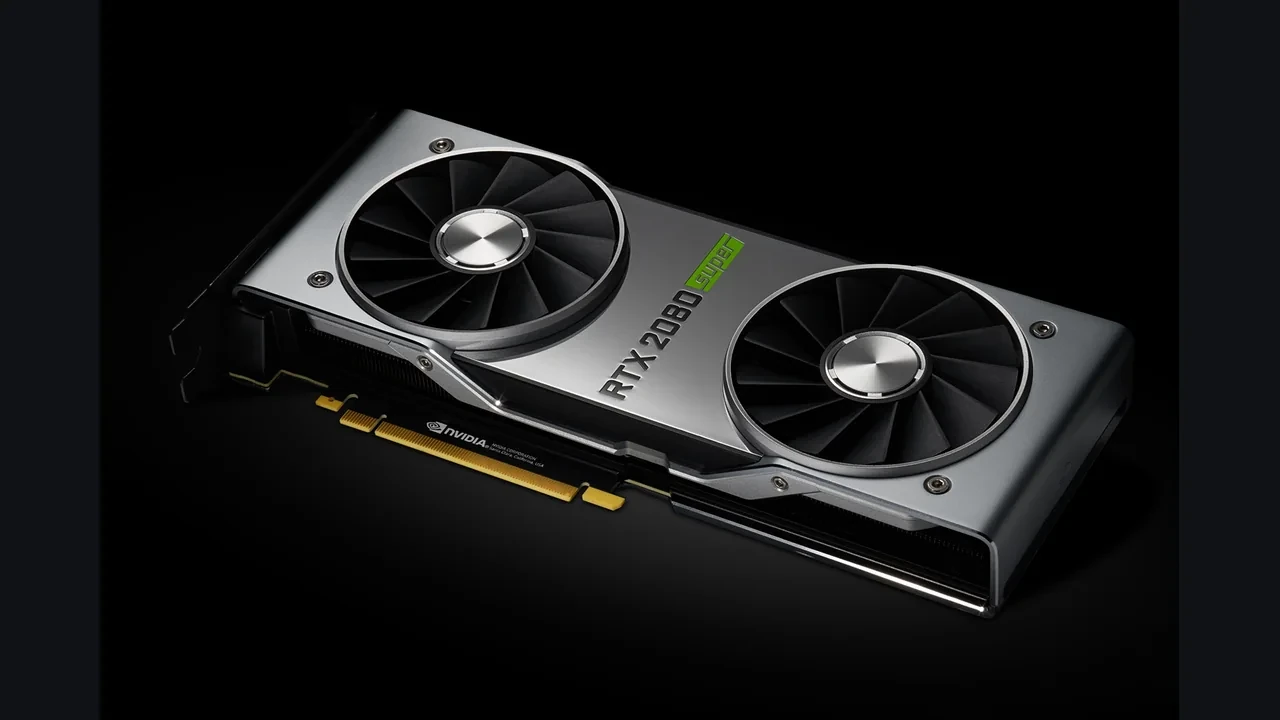
GeForce RTX 2080 SUPER DLSS 5 compatibility: what is actually known
NVIDIA has not announced official DLSS 5 support for the GeForce RTX 2080 SUPER. The card remains on the DLSS 4.5 feature line, including Super Resolution and Ray Reconstruction, and no published DLSS 5 list includes the RTX 20 series.
That is the working answer for engine integration, certification, and hardware planning.
An unclear compatibility claim can turn into support tickets, refunds, and angry forum threads. Store pages and trailers should distinguish newer supported GPUs from the RTX 2080 SUPER rather than implying that one DLSS label covers every RTX generation.
Developers, technical artists, and players can all verify the active path from the same chain of evidence: NVIDIA’s support list, the installed driver, the SDK version in the game, and the controls the runtime exposes.
NVIDIA’s published DLSS 5 position
NVIDIA’s research landing page describes DLSS 5 as a new neural-rendering generation beyond the upscaling and Ray Reconstruction models used by earlier releases. The launch material discusses new model behavior, updated integration, and more developer controls. It does not move older GPUs into the new feature line. Until NVIDIA publishes a compatibility matrix or driver note naming the card, teams should keep the RTX 2080 SUPER on DLSS 4.5.
The same rule applies to customer-facing text. Do not advertise DLSS 5 on hardware absent from NVIDIA’s official statement, and revisit the wording only when that statement changes.
The RTX 2080 SUPER in the Turing range
The GeForce RTX 2080 SUPER is a high-end Turing desktop card and a refresh of the original RTX 2080. Its dedicated RT cores handle ray tracing, while its Tensor Cores run the matrix operations used by deep-learning workloads. Those Turing Tensor Cores support a narrower instruction set than later Ampere, Ada Lovelace, and Blackwell designs. That difference limits which DLSS features can run efficiently or at all.
Driver support, SDK version, and hardware capability together set the feature ceiling. A driver may expose a new control, but an SDK cannot deliver acceptable performance when it expects Tensor operations that the silicon lacks or handles inefficiently. NVIDIA therefore publishes hardware lists at the SDK level instead of enabling every new feature across all RTX cards.
The RTX 20 series reference on Wikipedia establishes the family boundaries and silicon revisions, including the SUPER refresh. Read it alongside NVIDIA’s DLSS 5 page: the GeForce RTX 2080 SUPER belongs to a generation NVIDIA has not named for DLSS 5.
Why compatibility lines exist
DLSS renders a scene below the output resolution and uses a neural network to reconstruct the higher-resolution frame. Motion vectors, depth, and exposure data can stabilize that result. Current versions also include Ray Reconstruction, which can replace hand-tuned denoisers in ray-traced lighting. Tensor Cores execute the operations behind each stage.
A new generation may change its model architecture, input data, inference precision, or runtime contract. An older GPU might execute some form of the network, yet miss real-time performance or NVIDIA’s image-quality bar. Rather than release a degraded variant under the same name, NVIDIA normally keeps that card on the previous supported feature line.
For the RTX 2080 SUPER, the unresolved questions concern Turing’s supported precision and instruction mix and the cost of the DLSS 5 model at useful resolutions. NVIDIA’s compatibility statement answers both in practice, and the card is not on its current list.
Current compatibility summary
| Aspect | Current status for GeForce RTX 2080 SUPER |
|---|---|
| Official DLSS 5 support | Not announced; card is not on the published support list |
| Latest official DLSS feature line | DLSS 4.5 (Super Resolution, Ray Reconstruction) |
| Frame Generation on this card | Limited or unavailable, depending on the specific RTX 20 model and driver |
| Silicon generation | Turing (RTX 20 series) |
| Path to potential future support | Driver or SDK update that explicitly names the card in a published list |
| Developer guidance | Plan for DLSS 4.5; do not expose DLSS 5 options until the card is named |
DLSS 4.5 and DLSS 5 on older hardware
| Feature | DLSS 4.5 | DLSS 5 |
|---|---|---|
| Model architecture | Upscaling plus ray reconstruction, established pipeline | New neural rendering generation with updated model and integration pattern |
| Supported hardware at launch | Includes the RTX 20 series | Does not name the RTX 20 series in current public material |
| Frame Generation behavior | Available on selected RTX 20 models within DLSS 4.5 | Treated as a separate compatibility surface |
| Developer integration story | Pinned SDK, queryable feature set | New SDK expectations, new supported-hardware list |
| Implication for RTX 2080 SUPER | Continue to expose and test this feature line | Do not expose until the card is on the official list |
Production choices for a PC build
Previous DLSS releases introduced Frame Generation, Ray Reconstruction, and Multi Frame Generation with named GPU lists, sometimes extending them later through drivers or SDKs. The GeForce 20 series reference confirms that the RTX 2080 SUPER predates the Tensor Core changes used by newer features.
Set the minimum DLSS experience for each hardware tier. On the RTX 2080 SUPER, use DLSS 4.5 Super Resolution and Ray Reconstruction. Frame Generation may be unavailable or limited according to the exact RTX 20 model. A flat menu that always displays the newest option misleads users; a menu driven by detected capabilities is easier to test and support.
At startup, query the driver and SDK for the maximum supported version, then display only those options. Store copy should use the same tiering as the game and list minimum and recommended GPUs accordingly.
Automated QA should run representative cards from every supported tier and verify both menu state and performance. Exploratory testers should also use the actual RTX 2080 SUPER rather than a newer approximate equivalent. Older flagship hardware can expose visual and stability behavior that a modern mid-range card does not.
Engine and art integration checks
Super Resolution, Frame Generation, Ray Reconstruction, and Multi Frame Generation have separate support surfaces. Do not treat DLSS as one switch. On the RTX 2080 SUPER, expose DLSS 4.5 Super Resolution and Ray Reconstruction, leave Frame Generation disabled, and withhold DLSS 5 until NVIDIA names the card.
Motion vectors, depth, and exposure buffers can also change contract between versions. A build validated against one SDK may show artifacts with another. Pin the SDK in the build and let the driver negotiate the runtime version instead of taking every SDK update immediately.
Early DLSS 5 work should begin on officially supported hardware. Expand to an older card only after the device list changes. This prevents a studio from integrating and advertising a feature it later has to remove.
Advice for RTX 2080 SUPER owners
The card remains serviceable for DLSS 4.5. Super Resolution, Ray Reconstruction, and related presets continue to work when the driver and game are current. A routine update will not add DLSS 5 unless NVIDIA explicitly changes the support list, and the safer expectation is that it will not.
Keeping or replacing the card depends on target resolution, frame rate, preferred visual features, and budget. It still suits 1080p or 1440p at high refresh with DLSS 4.5. For 4K, path tracing, or DLSS 5, moving to a listed GPU is the cleaner option.
A current game’s graphics menu should show only what the card and driver expose. If DLSS 5 is absent, repeated driver installations and setting changes will not make it appear before official support exists.
How to use the official documentation
The NVIDIA DLSS 5 research landing page describes the feature line, integration, and support story that NVIDIA chooses to publish. The RTX 20 series reference establishes the Turing family, original launch range, and SUPER refresh. Together, they place the RTX 2080 SUPER outside the announced DLSS 5 generation.
Do not infer a backport from silence, a newer driver number, or architectural similarity. None of those is a support statement.
Checks you can run today
Developers should call the SDK function that returns the maximum supported feature set for the active card and driver. Use that result to build the graphics menu. Then run the RTX 2080 SUPER in the build matrix and verify that store-page specifications match the features seen in game.
Players should confirm the driver version, inspect the graphics menu, and run a short benchmark at the intended resolution and preset with a frame-time overlay. A current driver prevents stale software from hiding an existing feature, while the benchmark answers whether the card still meets the desired experience.
Technical artists should verify the pinned SDK and its integration guide, then review heavy ray tracing, fast motion, and UI overlays for visual regressions.
The RTX 2080 SUPER in a current PC plan
The card still handles many modern games at 1080p and 1440p, especially with DLSS 4.5 Super Resolution. Its VRAM, RT Core count, and Tensor Core count trail newer flagships, but the feature ceiling matters more than raw shader speed when discussing DLSS 5.
For a long-tail PC build, the RTX 2080 SUPER is a useful test point for the high end of an older generation that many players still own. Keeping it in the DLSS 4.5 matrix protects that audience. Dropping it without clear messaging invites support complaints.
A player can reasonably keep the card for another product cycle at 1080p or 1440p with DLSS 4.5. A target of 4K, heavy ray tracing, or DLSS 5 calls for an upgrade because those workloads will either miss the frame-rate goal or remain unavailable.
Why earlier support expansions prove little here
NVIDIA has occasionally broadened DLSS features through driver or SDK updates. Frame Generation started on Ampere and later expanded in scope. Multi Frame Generation began on Ada Lovelace and sits within the newer Blackwell-era line. Each expansion came with a public announcement and support list rather than appearing silently.
That pattern leaves a DLSS 5 backport possible, not promised. Turing’s Tensor instruction set, required precision, and model cost may draw a different line. Until NVIDIA names the RTX 2080 SUPER, keep it on DLSS 4.5.
“Future support remains unknown” is not a hint that support is coming. It is equally consistent with a closed list.
Studio decisions to settle before launch
Match every GPU tier to its maximum DLSS line and use the same matrix for the game menu, store page, and QA plan. Pin a known SDK while letting the driver negotiate its runtime. Finally, copy NVIDIA’s support terminology into marketing and patch notes instead of claiming features on unnamed hardware.
Pre-production teams should still treat the DLSS 5 list as changeable. Target supported cards for the newest path and place older GPUs in a separate tier. That one planning pass costs much less than later refunds, support tickets, and corrections.
When to revisit the answer
Update the status if NVIDIA publishes a revised device list, releases a driver or SDK that names the RTX 2080 SUPER, or announces a backport. Until one of those happens, third-party claims remain unverified.
Developers should follow the DLSS SDK release feed because its notes name affected cards and features. Players should read the patch notes for each game, since the title’s bundled SDK decides what its menu can expose even when the system driver is newer.
The current answer reflects public information available before the NVIDIA DLSS 5 launch window and should be checked again when the official list changes.
Frequently asked questions
Does the GeForce RTX 2080 SUPER support DLSS 5?
No official support has been announced. NVIDIA’s published material does not name the RTX 20 series, so the card should be treated as unsupported until a compatibility statement says otherwise.
What DLSS version does the RTX 2080 SUPER officially support?
DLSS 4.5 is the latest official line for RTX 20 hardware, including Super Resolution and Ray Reconstruction. Frame Generation availability depends on the exact RTX 20 model and driver and should be checked in the game menu.
Could a driver update add DLSS 5 support to the RTX 2080 SUPER later?
It is possible in principle because NVIDIA has expanded earlier DLSS features through drivers and SDKs. No DLSS 5 expansion has been announced for RTX 20, so current plans should treat the card as unsupported while acknowledging that the list can change.
How can a developer confirm DLSS support on a specific card at runtime?
Call the SDK query that returns the maximum feature set for the current GPU and driver. Build the menu from that result instead of a hard-coded card list.
How should a store page describe DLSS 5 support on older hardware?
List the minimum and recommended GPU tiers, and mention DLSS 5 only beside hardware on NVIDIA’s support list. Name DLSS 4.5 for older tiers rather than implying they receive the newest path.
Is the RTX 2080 SUPER still worth keeping for modern PC games?
It remains useful at 1080p and 1440p with DLSS 4.5. Aiming for 4K, heavy ray tracing, or DLSS 5 makes an upgrade worth planning. Resolution, desired effects, and budget should decide the timing.
What is the difference between DLSS 4.5 and DLSS 5 for a developer?
DLSS 4.5 combines Super Resolution, Ray Reconstruction, and limited Frame Generation on supported cards. DLSS 5 uses a new neural-rendering architecture, integration pattern, and hardware list. Treat them as separate compatibility surfaces.
What should QA test when adding DLSS 5 to a build?
Run one representative GPU from every supported tier, verify its menu options, and capture frame-time plus image-quality results in representative scenes. Keep the RTX 2080 SUPER in the matrix to validate DLSS 4.5 even when DLSS 5 stays hidden.
Where can a developer read the official DLSS 5 support list?
NVIDIA publishes the launch feature set, integration guidance, and hardware story on its DLSS 5 research landing page. Check it first when planning support.
How should a player verify DLSS 5 support on their own card?
Use the graphics menu in a current DLSS 5 game. If the option does not appear with a current driver, the card is outside the supported set for that build. Remember that both the system driver and the game’s bundled SDK matter.




Leave a Reply