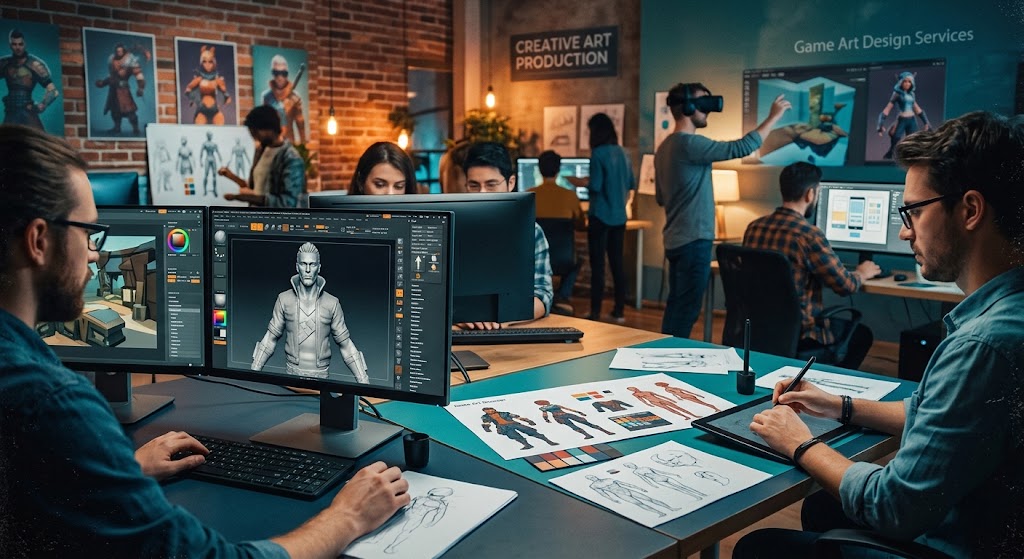
Game Art Design Services for Modern Game Developers
Creating a modern video game takes more than just slick code and tight mechanics. Visually, your project needs to grab players immediately and hold their attention for hours. That is where professional studios step in to bridge the gap between creative vision and technical execution.
Building an internal art department from scratch requires massive capital, months of recruiting, and ongoing management overhead. Outsourcing these tasks allows studios to scale production dynamically while retaining access to elite talent across various artistic disciplines.
Think about how fast visual trends shift in the gaming industry. Keeping up with PBR workflows, stylized shaders, and character rigging demands specialized skill sets. By bringing in dedicated partners, you get instant access to veterans who live and breathe real-time art creation every single day.
And let us be honest about production realities. Bottlenecks happen. Schedules slide. Having a flexible creative team on standby keeps your pipeline moving without forcing you to rush critical asset passes or compromise on final visual fidelity.
So, what does it actually take to build a world that feels alive? It starts with a deep understanding of visual storytelling, engine constraints, and optimization techniques. Let us explore how modern external production pipelines make that happen.
Why Studios Rely on External Game Art Design Services
Game production timelines move fast. Missing a release window can derail an entire launch marketing strategy. Working with dedicated game art design services gives development teams the flexibility to add extra production capacity exactly when needed.
External art partners bring specialized pipelines, fresh creative perspectives, and established workflows. Whether you need initial visual exploration or mass-production of 3D props, specialized teams handle the heavy lifting without bloat.
Look at how indie developers and AAA studios alike structure their pipelines today. Rarely does a team handle every single asset in-house. Instead, core teams focus on gameplay logic, world layout, and narrative, while remote specialists deliver polished environment kits, vehicle models, and character variations.
This approach keeps overhead manageable during pre-production while allowing teams to ramp up quickly during active asset generation. Here is a look at how creative tasks are commonly broken down across external teams:
- Concept art and pre-visualization for characters, keyframes, and environmental moods.
- Full-cycle 3D modeling, texturing, rigging, and animation ready for game engines.
- 2D asset creation, sprite sheet generation, and detailed illustrations for UI elements.
Another major advantage comes down to domain expertise. A team that spends all month modeling military hard-surface vehicles will finish those assets faster and at higher quality than a generalist 3D artist trying to do everything at once.
Specialization drives efficiency. When you plug specialized game art design services into your development pipeline, your internal leads spend less time troubleshooting asset issues and more time building great game mechanics.
Choosing the Right Game Art Design Services Partner
Not all external art studios offer the same capabilities. Selecting the right team for your game art design services requires evaluating technical mastery alongside artistic versatility. You need creators who understand engine limits, draw calls, and texture memory allocations.
A great portfolio shows flexibility across artistic styles, ranging from hyper-realistic realistic environments to highly stylized hand-painted characters. Communication protocols and milestone management are equally crucial to ensure project delivery stays on schedule.
Before signing any contract, run a small test milestone. Give the studio a single character or prop to build according to your technical art documentation. This test quickly reveals how well they follow instructions, stick to poly-count budgets, and handle feedback rounds.
Here is a detailed breakdown of core service categories, typical deliverables, and standard industry tooling across production pipelines:
| Service Category | Core Deliverables | Primary Tools Used | Target Engine Integration |
|---|---|---|---|
| Concept Art | Character Sheets, Environment Keys, Moodboards | Photoshop, Procreate, Blender | Pre-production / Documentation |
| 3D Asset Creation | Low/High Poly Models, PBR Textures, LODs | Maya, ZBrush, Substance Painter | Unreal Engine, Unity, Custom Engines |
| Animation & Rigging | Skeletal Rigs, Idle/Action Loops, Blendshapes | Maya, MotionBuilder, Blender | Mecanim, Control Rig, Custom Trees |
| UI/UX Design | HUD Elements, Menu Layouts, Interactive Icons | Figma, Photoshop, Illustrator | UGUI, Slate, Rive, NoesisGUI |
Financial planning is another critical piece of the puzzle. Understanding how budgets shift across different phases helps prevent unexpected shortfalls midway through development.
Here is how production budgets are typically distributed across standard asset creation stages:
| Production Phase | Estimated Budget Share | Key Milestones | Common Bottlenecks |
|---|---|---|---|
| Pre-Production & Style Guide | 15% – 20% | Art Bible, Moodboards, Benchmark Assets | Unclear Vision, Style Revisions |
| Asset Production & Texturing | 45% – 50% | Full Asset Library, PBR Maps, LOD Generation | Poly-count Creep, Texture Sizes |
| Rigging & Animation | 20% – 25% | Skeleton Setup, Animation Sets, Physics Tuning | Weight Painting, Bone Counts |
| Engine Integration & QA | 10% – 15% | Lighting Passes, Shader Optimization, Bug Fixes | Performance Drops, Draw Calls |
Budgeting accurately requires clear documentation upfront. If your technical art specification sheet lacks clear guidelines on texture maps, collision setups, or bone counts, prepare for iteration cycles that drive costs up fast.
Clear communication is the ultimate cost saver. Establish daily or weekly check-ins via Slack, Discord, or project management boards like Jira to catch visual or technical mismatches before assets hit the engine build.
Key Stages of the Game Art Production Pipeline
Every successful visual asset follows a structured production path. Skipping steps leads to costly re-work later in development. Professional teams adhere strictly to standard pipeline procedures.
First comes conceptualization. Ideas are sketched quickly to test shape language, proportion, and color schemes. Once a concept is approved, technical artists create low-polygon or blockout basemesh structures to test scale directly inside the target game engine.
Scale matters enormously in games. A character model that looks stunning in a 3D modeling package might feel completely out of proportion when placed next to a door frame inside Unreal Engine or Unity. Early engine testing catches these scale discrepancies immediately.
After scale verification, high-poly sculpting begins. Digital sculptors add fine details like wrinkles, cloth folds, armor scratches, and skin pores using tools like ZBrush. This high-detail mesh serves as the visual target for baking normal maps onto low-poly game models.
Retopology follows sculpting. This process rebuilds the mesh geometry with clean polygon flow, ensuring the model deforms naturally during character animation while staying light enough for real-time rendering.
Here are the primary stages every 3D game asset goes through during creation:
- Concept Approval: Establishing visual direction and character/object scale.
- High-Poly Sculpting: Crafting dense geometry for intricate surface detail.
- Retopology & UV Unwrapping: Building light, optimized mesh topology for real-time rendering.
UV unwrapping flattens the 3D surface into a 2D map for texturing. Clean UV maps prevent texture stretching and maximize texture space efficiency, ensuring crisp visual details without inflating texture file sizes.
Texturing brings assets to life using Physically Based Rendering (PBR) workflows. PBR textures simulate how light interacts with different materials like steel, leather, wood, or glass, creating believable surfaces across lighting conditions.
Finally, the asset undergoes rigging and animation if required, followed by engine integration. Technical artists configure materials, physics colliders, and level of detail settings inside the game editor to ensure smooth performance.
Essential Technical Requirements for Game Art Assets
Game art is distinct from static 3D rendering for film or architectural pre-visualization. Real-time rendering demands strict optimization to ensure frames run smoothly at high refresh rates on target hardware.
Texture memory budgets are critical. Artists pack texture maps into combined RGBA channels to save memory bandwidth. Level of Detail (LOD) models are generated so distant objects display lower poly-counts, preserving computing resources for close-up action.
Consider mobile game development versus desktop or console production. A mobile title might cap main character models at 10,000 polygons with single 2K texture sheets. A current-gen console game might allocate 100,000 polygons and multiple 4K PBR texture sets to a hero character.
Understanding target hardware constraints from day one prevents painful optimization crunches right before shipping your game build.
Key technical practices employed by production studios include:
- Channel Packing: Storing Roughness, Metallic, and Ambient Occlusion in single texture files.
- Texel Density Consistency: Ensuring uniform detail resolution across all world objects.
- Modular Asset Kits: Building reusable architectural pieces to assemble vast game environments efficiently.
Modular building pieces, like wall segments, pillars, and floor tiles, snap together along grid lines. This modular workflow lets level designers build massive castles, futuristic space stations, or sprawling dungeons using a compact kit of optimized 3D assets.
Lighting and shading further enhance environment mood without adding heavy polygon geometry. Custom vertex colors, decal meshes, and shader effects add visual variety to repeated environment props, keeping world scenes visually rich yet light on performance budgets.
Now let us address some common questions developers ask when looking to hire game art design services for their upcoming game releases.
Frequently Asked Questions
What Are Game Art Design Services?
Game art design services refer to professional studio offerings that produce visual assets for video games. These services cover pre-production concept art, 2D sprite creation, 3D character and environment modeling, rigging, animation, UI/UX design, and engine integration.
How Much Do Professional Game Art Design Services Cost?
Costs depend heavily on project scope, visual complexity, art style, and studio location. Simple 2D assets or low-poly props might cost a few hundred dollars, whereas complex rigged 3D hero characters or expansive custom environments can range from several thousand dollars upwards.
What Is the Difference Between 2D and 3D Game Art?
2D game art relies on flat images, sprites, and vector illustrations created on two axes (X and Y). 3D game art involves building three-dimensional geometry (X, Y, and Z axes) using polygons, which can be rotated, lit realistically, and animated from any camera angle inside modern engines.
Why Should Developers Outsource Game Art Production?
Outsourcing allows game developers to access specialized talent on demand without taking on long-term payroll overhead. It helps studios scale production rapidly during peak development cycles and leverages established artistic pipelines to deliver assets on tight deadlines.
Which Game Engines Are Supported by Art Studios?
Most art studios support all major commercial game engines, including Unreal Engine, Unity, Godot, and CryEngine. They also work regularly with custom proprietary engine pipelines by following specific project export guidelines and technical documentation.
How Long Does It Take to Create a 3D Game Character?
Creating a production-ready 3D character typically takes between 2 to 6 weeks. This timeline covers concept artwork, high-poly sculpting, retopology, UV unwrapping, PBR texturing, rigging, and testing basic movement animations inside the game engine.
What Software Do Game Artists Use Most Frequently?
Industry-standard tools include Autodesk Maya, 3ds Max, and Blender for modeling and rigging. ZBrush is used for high-poly sculpting, while Substance 3D Painter and Designer handle texturing. Photoshop and Figma are standard for 2D visual design and UI creation.
Conclusion
Partnering with expert game art design services provides game developers with the creative bandwidth and technical precision needed to bring ambitious worlds to life. From initial conceptual sketches to fully optimized real-time 3D assets, external art teams streamline production timelines while maintaining high aesthetic quality. By establishing clear technical standards, structured pipelines, and open communication, developers can focus on gameplay mechanics while their art partners build captivating visual experiences that stand out in today’s competitive market.
Leave a Reply